
Feature first available:
iPECS Cloud version 8.0.
License Required:
iPECS Cloud Premium or Premium Plus licensing is required to use this feature.
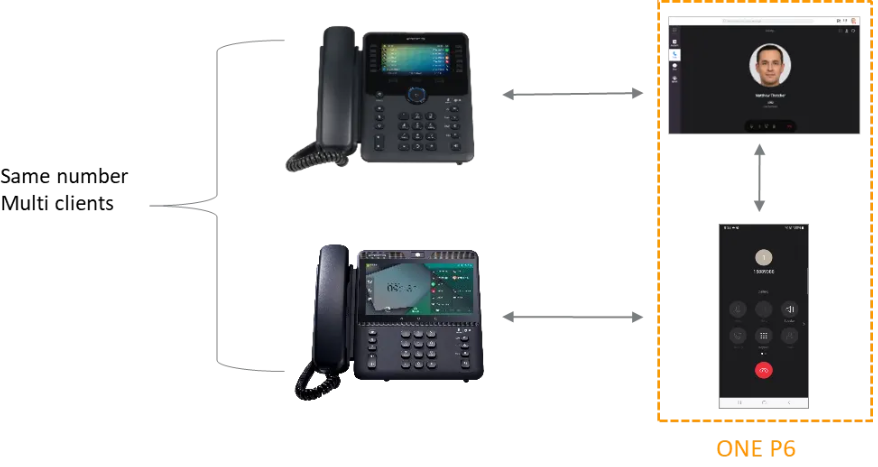
Description: How to move a call between a desktop and iPECS ONE
- Call Move
- Enables seamless call movement between devices using the same account
- ONE Client Call Move
- Previous release supported call movement only between a desktop phone and the ONE Client.
- As part of the ONE upgrade, it is now supported to call Move between ONE Clients.
- E.g. a call can now be moved between the ONE web client to a ONE mobile app on your smart phone or tablet or vice versa.
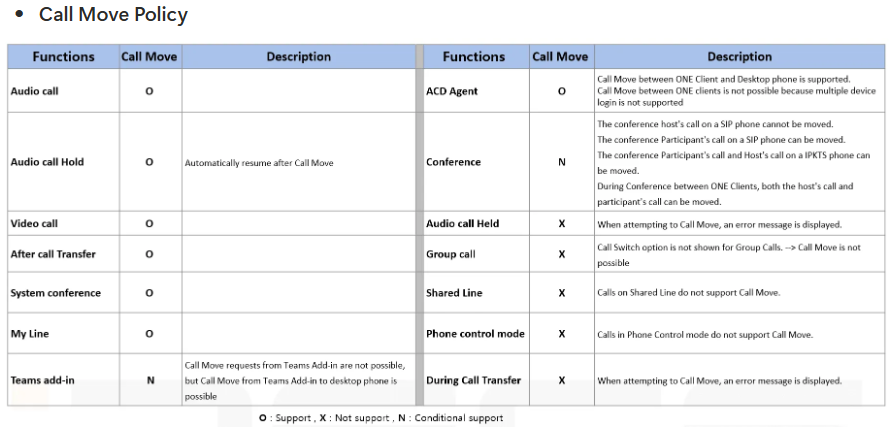
- Limitations
- Call Move is not supported for group calls, held calls, or phones with multiple calls.
- Call Move is not supported for Teams add-in device.
- Showing Call Duration in ONE Call log
- Call Duration in ONE
- Call duration is calculated only for each call leg.
- The call duration of the service itself, which includes multiple call legs, is not calculated.
- Since call duration is calculated internally by ONE, the duration is not synchronized with the duration of other services in iPECS Cloud.
- You can check each call duration in Call Log Details.
- Call Duration in ONE

